
How we built a custom catering web app powering $145K+ in revenue and 8,000+ lunch boxes for Mountain Mama's Café in the US
How a high-volume catering operation near Yellowstone National Park moved from fragile Google Sheets and missed orders to a custom platform that generated over $145K in operations, served 8,000+ box lunches to tour companies, and scaled past 15 tour company partners.
Kimberly Howell and her high-volume tour catering operation at the west entrance of Yellowstone National Park.
Started in 2017 in West Yellowstone, Montana, Mountain Mama's Café is a newly remodeled bakery and deli run by Kimberly Howell. Along with serving town locals and park visitors with a full-service Starbucks, homemade pot pies, and huckleberry pastries, Kim runs a busy box lunch catering operation that feeds tour groups every day during the Yellowstone season.
Her kitchen prepares everything with local Montana meats—like elk, bison, trout, and pheasant—along with beef, chicken, and vegetarian options. Everything is made on bread baked in-house fresh every morning, with homemade cookies and gluten-free choices so every guest is taken care of.
Her catering customers don't walk in off the street. They arrive by the busload: groups of 20, 40, or 60+ people from wildlife safari tours, scenic tour agencies, and hiking outfitters who need their boxed meals ready before sunrise for full-day trips into the park.
Every sandwich has a specific guest's name on it, their bread choice, a cookie, and important allergy notes (like celiac, severe nut allergies, or vegan diets). If a lunch gets mixed up, a guest 50 miles deep into Yellowstone opens the wrong box with zero cell service and no way to get a replacement.
How the original spreadsheet setup worked, and where it started to break as orders grew.
When we first started working together in early 2025, the entire catering operation was held together by Google Forms, Google Sheets, and late-night text messages:
- Each tour company had its own separate Google Form that guides or guests filled out.
- Each form fed responses into its own separate Google Sheet.
- A centralized Master Sheet tried to pull rows from all those individual company sheets using complicated formulas.
- Kitchen staff had to filter tabs by date, print slips, and tally up lunch totals by hand.
- Every time Kim signed a new tour company, she had to manually copy the Google Form, create a new sheet, and rewire formulas into the master sheet.
Where the Setup Was Breaking Down
Orders submitted through Google Forms sometimes failed to sync into the master sheet, putting morning bus departures at risk.
Managing dozens of interconnected tabs, complex formulas, and manual workarounds created an unsustainable administrative burden that was frustrating to navigate daily.
Kim had to refresh sheets constantly and scroll through months of old rows just to figure out how many sandwiches to bake each morning.
Signing a new tour company meant building a whole new form, setting up new spreadsheets, and troubleshooting broken formulas.
Monthly billing was slow and easy to mess up. Numbers had to be calculated across spreadsheets, converted to PDFs, and emailed to clients one by one late at night.
Because tour companies had direct access to their spreadsheets, rows could accidentally be edited or deleted even after lunches had already gone out into the park.
How we went step-by-step from fixing spreadsheets to building a custom platform.
Stabilizing Spreadsheets
Fixed master sheet formulas and automated sorting to keep morning kitchen prep reliable while mapping out full app requirements.
Mobile Prototype
Built and tested a fast, intuitive mobile ordering interface designed for tour guides ordering on the road in under 2 minutes.
Production Rollout
Launched dedicated partner portals, automatic order lockouts, bilingual kitchen prep slips, and automated Stripe billing.
“I just really hope that this interface is quick and easy like most apps are. I don't want it to be cumbersome for the user, yet I want them to be able to specify their lunches exactly how they want.”
— Kimberly Howell, Founder & CEO, Mountain Mama's CaféA quick video walkthrough of the app and a gallery of the live screens.
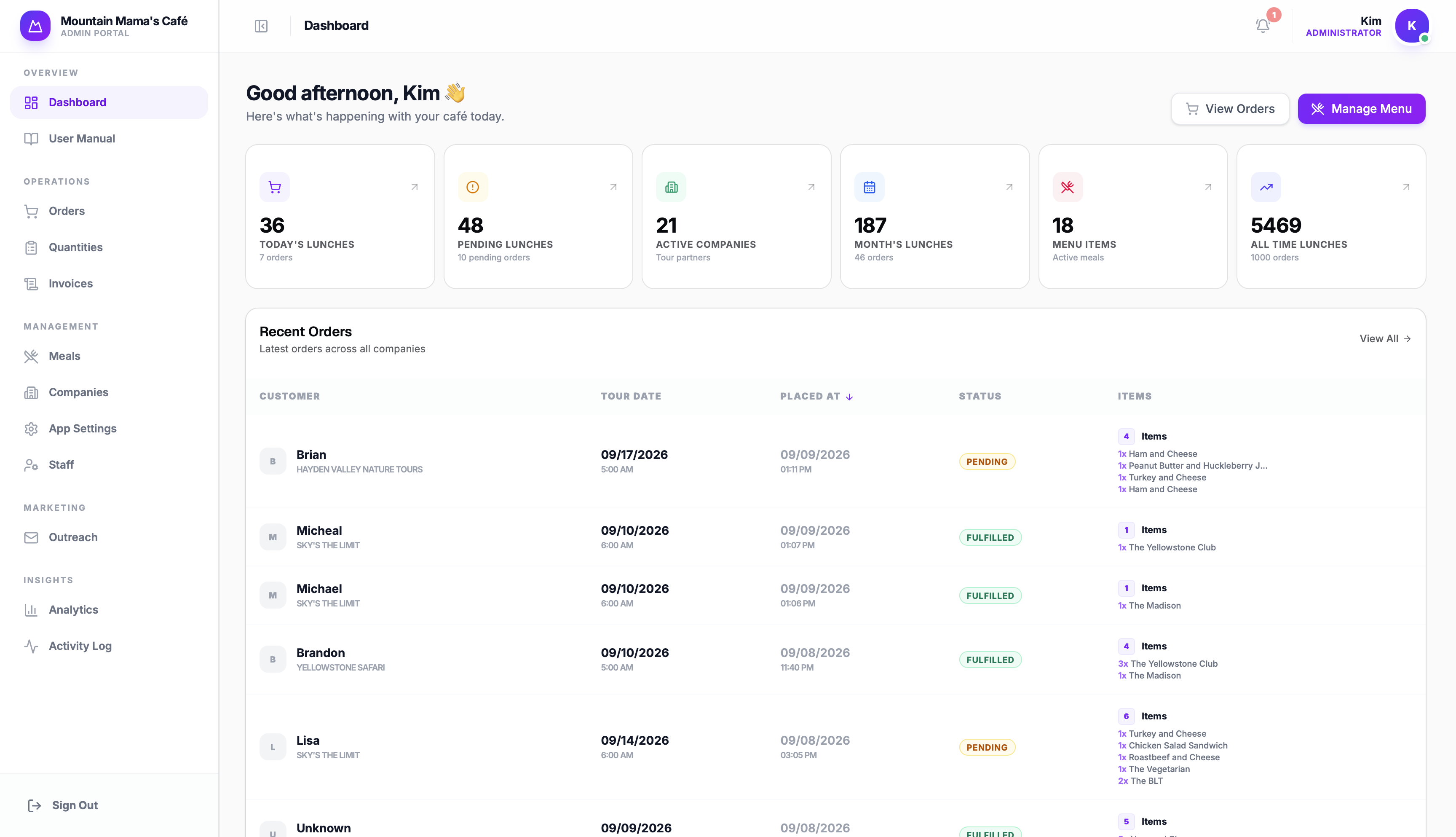
A simple breakdown of what was built for the café staff, tour companies, and guests.
1. Admin Operations Portal
Where Kim and her team run daily kitchen shifts, track orders, and handle billing without the spreadsheets:
Shows today's orders at a glance, with a pleasant chime whenever a new order comes in so nothing gets missed.
Print clean lunch box tickets with guest names, sandwich choices, and allergy notes ready to stick on the boxes.
If the kitchen runs low on sourdough or turkey, staff can hide it in seconds so guests can't pick it.
Locks orders before early morning prep starts, stopping last-minute changes while the team is packing.
Totals up all breads, meats, and cookies needed for the shift, with a one-click switch to Spanish for prep cooks.
Creates itemized invoices automatically and sends them out, replacing hours of late-night manual math.
Approve new tour companies, share custom ordering links, and preview their portal directly to help if they need support.
A clear training guide right inside the admin dashboard so new kitchen hires can learn the flow on day one.
2. Tour Company Portal
A dedicated space where tour companies manage their lunch orders and invoices on their own schedule:
New companies sign up in minutes, choose how they want to pay, and sign their catering agreement digitally.
Dispatchers can view upcoming tour dates, see total lunch counts, and copy their guest ordering link with one click.
Companies can choose which meal formats they want to offer their guests and add specific pickup instructions.
Partners can see their invoices, check past receipts, and pay online by card or direct bank transfer.
Search orders by tour date, check guest dietary notes, and print clean departure sheets for tour guides.
A practical guide built into the portal showing dispatchers how to order and manage tours without having to call the café.
3. Guest Ordering App
A smooth, mobile-friendly checkout that tourists and guides can finish in under two minutes from their phone:
Open the tour company's link on any phone or browser.
Choose an entrée, fresh bakery bread, a cookie, and note food allergies.
Check all selections and dietary tags before moving forward.
Enter guest name, tour date, pickup time, and guide's name.
Order confirmation shows immediately and syncs straight to prep lists.
A couple of practical challenges we worked through while rolling out the app during the busy summer season.
While switching over, a few companies still used Google Forms while others moved to the new app. We kept both flows syncing into the kitchen prep list so no lunch was ever dropped or duplicated.
Tour operators run on tight morning schedules. If a dispatcher had trouble logging in or needed a last-minute adjustment, we jumped on it immediately so trips stayed on track.
A side-by-side look at how daily catering operations ran before and after the new platform.
“It's a pleasure to work with you! You are very bright! Thank you for hanging in there with me while we grow this system.”
Takeaways from building and supporting software for a busy local business.
Kim's business ran on spreadsheets. Instead of pushing a brand-new app on day one, we started by fixing the existing sheets. That kept orders moving and built trust before proposing a bigger investment.
We hopped on quick calls, sent screen recordings, and stayed in touch regularly over WhatsApp. Being responsive when an urgent question popped up made the rollout succeed.
Kim runs a bakery and a business—she isn't an IT admin. The app had to be intuitive for kitchen staff at 5:30 AM, easy to read in Spanish for prep cooks, and simple for busy tour guides.
Have an operational workflow that outgrew spreadsheets?
Flowbetta builds custom web platforms, automated data pipelines, and internal tools tailored around how your team actually works.